 |
Claims Workspace™, Estimate™ and mobile apps Upcoming URL changes |
|
As part of our transition to Cotality branding, we are updating the web address for Claims Workspace™. Please note: Your Company IT should review and allowlist the new URLs immediately in preparation. Workspace™ at www.symbility.net and other regional subdomains are transitioning to <subdomain>.cotality.app.
Please see below for details about North America regions/environments.
 Staging environment Key dates:
- October 28, 2026 - Staging 8.8 Release date: The NEW Staging URL becomes available
(staging-claimsworkspace.cotality.app).
Notifications will start using the NEW URL email:
noreply-staging@claimsworkspace.cotality.app
- Add it to your safe senders
- Update your inbox rules
- February 17, 2027: Before 8.9 release date the NEW URLs must be allowlisted by your company IT so that apps will continue to sync and update using the NEW URLs:
downloads-staging-claimsworkspace.cotality.app
staging-claimsworkspace.cotality.app
- Estimate™ for Desktop
- Estimate™ for iOS,
- CAPTURE™ for Android
- Mobile Claims™ for Android - May 31, 2027: Before this date, Companies using SSO must transition to NEW URL.
- June 1, 2027: The current URL (staging.symbility.net) will be retired.
- will show a "page not found message"
- will not redirect to the new URL
- June 1, 2027: Mobile Claims app for iOS and Android will be retired.
Alternatives: Estimate™ for iOS or Estimate™ for Windows (desktop)
Please note that the Release 8.8 and 8.9 release dates remain subject to change. We'll share updates over email and through Claims Workspace as the migration progresses.
 Canada Key dates
- November 19, 2026 - Canada 8.8 Release date: The NEW Prod-CA URL becomes available
(ca-claimsworkspace.cotality.app).
Notifications will start using the NEW URL email:
noreply-ca@claimsworkspace.cotality.app
- Add it to your safe senders
- Update your inbox rules
See also in French: Prod-CA URL change to ca.symbility.net - March 10, 2027: Before 8.9 release date the NEW URL must be allowlisted by your company IT so that apps will continue to sync and update using the NEW URL:
downloads-ca-claimsworkspace.cotality.app
ca-claimsworkspace.cotality.app
- Estimate™ for Desktop
- Estimate™ for iOS,
- CAPTURE™ for Android
- Mobile Claims™ for Android - May 31, 2027: Before this date, Companies using SSO must transition to NEW URL.
- June 1, 2027: The current URL (ca.symbility.net) will be retired.
- will show a "page not found message"
- will not redirect to the new URL
- June 1, 2027: Mobile Claims app for iOS and Android will be retired.
Alternatives: Estimate™ for iOS or Estimate™ for Windows (desktop)
Please note that the Release 8.8 and 8.9 release dates remain subject to change. We'll share updates over email and through Claims Workspace as the migration progresses.
 USA Key dates
- December 3, 2026 - US 8.8 Release date: The NEW Prod-US URL becomes available
(us-claimsworkspace.cotality.app).
Notifications will start using the NEW URL email in version:
noreply-us@claimsworkspace.cotality.app
- Add it to your safe senders
- Update your inbox rules
- March 24, 2027: Before 8.9 release date the NEW URL must be allowlisted by your company IT so that apps will continue to sync and update using the NEW URL:
downloads-us-claimsworkspace.cotality.app
us-claimsworkspace.cotality.app
- Estimate™ for Desktop
- Estimate™ for iOS,
- CAPTURE™ for Android
- Mobile Claims™ for Android - May 31, 2027: Before this date, Companies using SSO must transition to NEW URL.
- June 1, 2027: The current URL (www.symbility.net) will be retired.
- will show a "page not found message"
- will not redirect to the new URL
- June 1, 2027: Mobile Claims app for iOS and Android will be retired.
Alternatives: Estimate™ for iOS or Estimate™ for Windows (desktop)
Please note that the Release 8.8 and 8.9 release dates remain subject to change. We'll share updates over email and through Claims Workspace as the migration progresses.
|
What this means for you:
This is a web address update only. There are no changes to your login credentials, Claims Workspace functionality, or your existing workflows.- The Transition Period: Both Workspace™ web addresses will remain fully functional from November 19, 2026, through May 31, 2027. This window gives you and your team ample time to update bookmarks and saved links.
- June 1, 2027: You must use the new address. The existing address (www.symbility.net) will no longer work after this date.
We will send additional reminders and updates throughout this transition period. If you have any questions, please contact your Customer Success representative. Thank you.
Checklist:- Tell your IT provider if you have one so they can whitelist the new address so it's allowed through firewalls and filters. If you sign in with your company's single sign-on, that will also need to be updated.
- You must whitelist the new addresses before Release 8.9, expected February 2027.
- Allow the new email sender as described above, and check your junk folder for the first few weeks.
- Use the banner in Claims Workspace to switch When you log in you'll see "We've moved!" Please update your bookmarks.
Save your work first. Anything unsaved will be lost.
Then click TAKE ME THERE.
You may be asked to confirm your username before you continue. - Update Workspace™ symbility.net hyperlinks on company portals and in documentation including links on company portals or remote desktops.
- Sync every day. If you use Estimate™, sync at the end of every working day, and especially before release 8.8 on:
- Canada: November 19, 2026
- USA: December 3, 2026 - Update Estimate™. Install the latest Estimate™ and Estimate™ for iOS when prompted. Older versions won't be able to sync or update once the old address is switched off.
- Re-apply your Workspace™ preferences. Preferences saved in your browser may need setting up again on the new address.
URL Changes
In version 8.8 - all live production versions of the Workspace™ website's Help menu option Upload a file to technical support that links to the Upload Facility URL will change.
| | Old URL | New URL | | Upload Facility | uploads.symbility.net | uploads-claimsworkspace.cotality.app |
Workspace™ web page URL changes | | Old URL | New URL | | Staging | staging.symbility.net | staging-claimsworkspace.cotality.app | | Prod-CA | ca.symbility.net | ca-claimsworkspace.cotality.app | | Prod-US | www.symbility.net | us-claimsworkspace.cotality.app |
Downloads, Updates and Syncing URL changes | | Old URL | New URL | | Staging | downloads-staging.symbility.net | downloads-staging-claimsworkspace.cotality.app | | Prod-CA | downloads-ca.symbility.net | downloads-ca-claimsworkspace.cotality.app | | Prod-US | downloads.symbility.net | downloads-us-claimsworkspace.cotality.app |
Notifications URL changes | | Old Sender | New Sender | | Staging | noreply_staging@symbility.net | noreply-staging@claimsworkspace.cotality.app | | Prod-CA | noreply-ca@symbility.net | noreply-ca@claimsworkspace.cotality.app | | Prod-US | noreply-us@symbility.net | noreply-us@claimsworkspace.cotality.app |
|
SSO ChangesAs part of the rebranding and URL transition customer company IT departments will need to update their Single Sign-On (SSO) configuration within their Identity Providers (IdPs) to authorize and route requests through the new Service Provider Issuer (Entity ID) and the new Assertion Consumer Service (ACS) / Redirect (Callback) URIs.
What Actually Changes for SSO SAML 2.0?Instead of managing certificate keys, the SAML 2.0 configuration changes are strictly limited to updating text-based metadata identifiers:
(Entity ID) Service Provider Issuer: IT teams must update their IdP settings to recognize the new domain identifier (Saml2/Issuer), which transitions legacy symbility.net domains to the new <subdomain>.cotality.app format.
| | Old EntityId | New EntityId | | Staging | staging.symbility.net | staging-claimsworkspace.cotality.app | | Prod-CA | ca.symbility.net | ca-claimsworkspace.cotality.app | | Prod-US | www.symbility.net | us-claimsworkspace.cotality.app |
(ACS) Assertion Consumer Service Redirect URL: IT teams must update the callback URLs to match the new endpoints so that SAML assertions are securely posted to the new domain. (ACS) Assertion Consumer Service
|
|---|
| Staging | Old
| staging.symbility.net/ux/saml2/acs
| | New | staging-claimsworkspace.cotality.app/ux/saml2/acs | | Prod-CA | Old
| ca.symbility.net/ux/saml2/acs
| | New | ca-claimsworkspace.cotality.app/ux/saml2/acs | | Prod-US | Old
| www.symbility.net/ux/saml2/acs
| | New | us-claimsworkspace.cotality.app/ux/saml2/acs |
Required SSO Configuration ChangesSpecific SSO settings that IT teams must update in their Identity Providers (IdPs) depending on the protocol they use: | SSO Protocol | Configuration Change Details |
|---|
| SAML 2.0 | Service Provider Issuer (Entity ID):
Update the old issuer value to the new issuer value (Saml2/Issuer), which replaces legacy symbility.net domains with the new *-claimsworkspace.cotality.app domains.
Assertion Consumer Service (ACS) URL:
● For HTTP POST binding: Update the ACS URL to the new Saml2/PostBindingRedirectUri.
● For Artifact binding (with "Requires a single ACS URL" ON): Update the ACS URL to the new Saml2/ArtifactBindingSingleRedirectUr. | | OpenID Connect (OIDC) | Redirect (Callback) URIs:
Update the authorized redirect/callback URIs to the new setting (OpenIDConnect/ClaimsConnectAuthenticationRedirectUri), replacing legacy symbility.net domains with the new <subdomain>.cotality.app domains. |
Transition and TestingTo minimize service disruptions, there is a backwards compatibility setting called Use old URLs and issuer for backwards compatibility within your Claims Workspace™ Company account's Single sign-on configuration blade to allow a phased migration.
SAML 2.0 example from the Staging environment 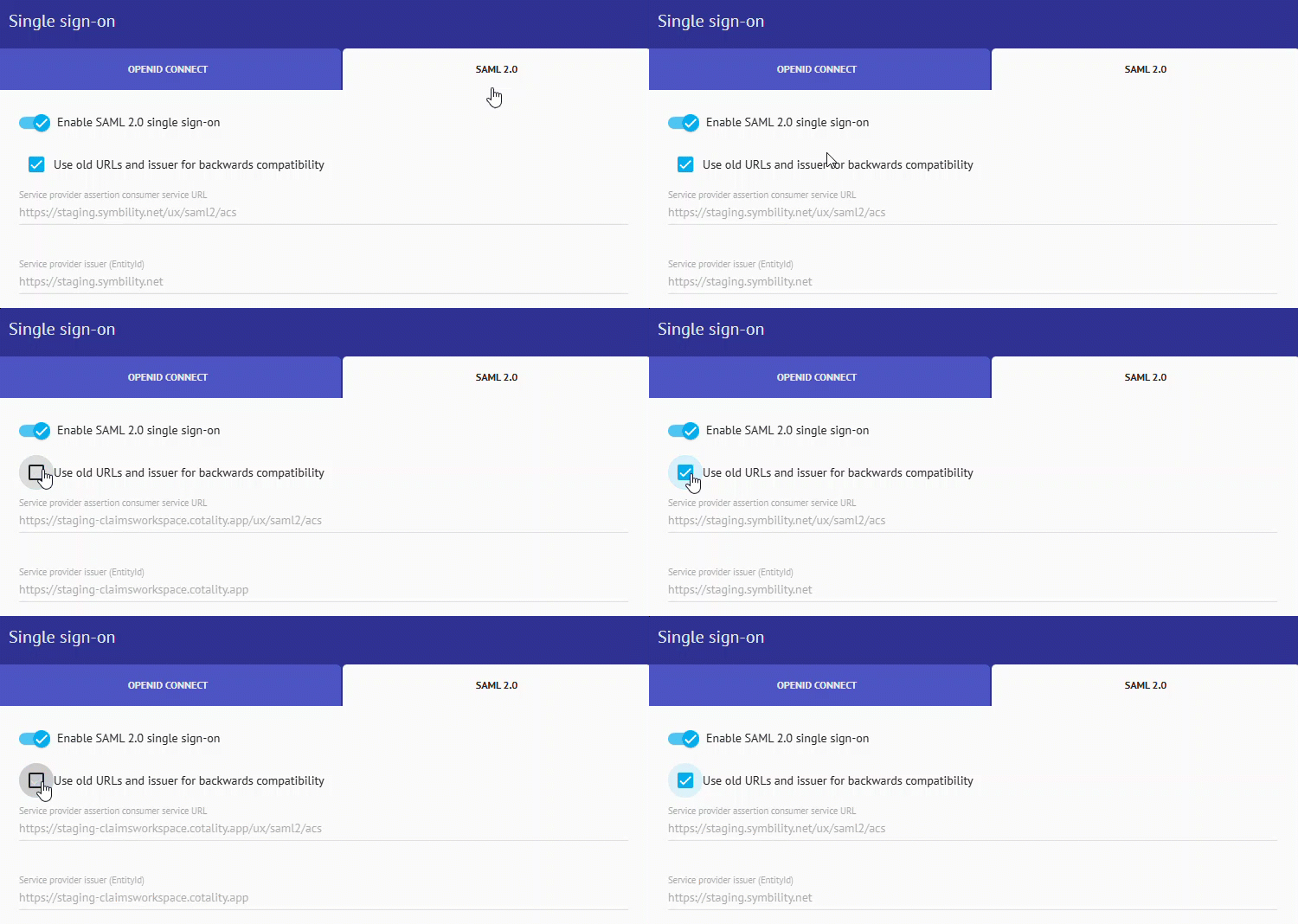
Customer IT departments should thoroughly test their modified SSO configurations on Staging or Pre-Production environments before migrating their production environments.
| When "Use old URLs and issuer for backwards compatibility" is ON |
|---|
SSO uses legacy URLs and issuer, allowing existing customer SSO integrations to continue working without immediate changes on the customer side.
User Login Warning Messages
If a user attempts to log in from the new URL while backwards compatibility is ON, a message is displayed to log in from the legacy URL.
Your organization's Single Sign-On (SSO) is still configured for our previous web address. Please Log in using our LEGACY URL to access your account.
After log in through the legacy URL, click on the TAKE ME THERE link in the top banner which will then log in to the NEW URL. |
| When "Use old URLs and issuer for backwards compatibility" is OFF |
|---|
Directs the SSO logic to process authentication exclusively with the new URLs and issuer, assuming the customer has successfully transitioned.
User Login Warning Messages
If they attempt to log in from the old URL after backwards compatibility has been turned OFF, they are directed to use the new URL and reminded to update bookmarks.
Your organization's Single Sign-On (SSO) has
been updated to our new web address. Please Log in using our NEW URL
and remember to update your bookmarks. |
SAML Certificates vs. HTTPS/SSL CertificatesThe table below clarifies how different certificates are handled during this rebranding transition: | Certificate Type | Details & Actions Required |
|---|
SAML Signing & Encryption Certificates
(Configured in the SSO/SAML blade) | Not Impacted by URL changes
The cryptographic trust relationship (public/private key pairs) used to sign, verify, and encrypt SAML assertions remains exactly the same. Customer IT teams do not need to generate, upload, or replace these certificates in the Claims Workspace configuration blade. | HTTPS/SSL Certificates
(Infrastructure & Web Server level) | Impacted by URL changes ⚠️
New SSL certificates are being deployed on load balancers, firewalls, and web servers to secure the new <subdomain>.cotality.app domains. While these are fully managed on the service provider side by our IT teams, external integration partners and specific mobile client applications must accept the new SSL certificates. This happens automatically in standard web browsers since certificate pinning is not enforced for end-user web access. |
|
This message is an important communication related to your current relationship with Cotality. © 2026 Cotality. All rights reserved.
Delivered by Cotality
40 Pacifica Suite 900, Irvine, California 92618 Privacy Policy Unsubscribe |